Device Mapping Library
The rtl_433 integration turns the JSON fields emitted by rtl_433 into Home Assistant entities using YAML files that map rtl_433 field names to Home Assistant entity descriptions.
Use device mappings to add support for fields your rtl_433 hardware already reports, without editing the integration code or waiting for a new release. You can add mappings from the Home Assistant UI; contributors can add mappings to pyrtl_433.
The YAML files and their loader are part of
pyrtl_433, the integration's runtime dependency. For the YAML schema, see the pyrtl_433 device-library reference.
Adding device mappings
You can extend or correct device mappings directly from the Home Assistant UI.
Settings → Devices & Services → rtl_433 → Configure (the gear icon) → Device mappings
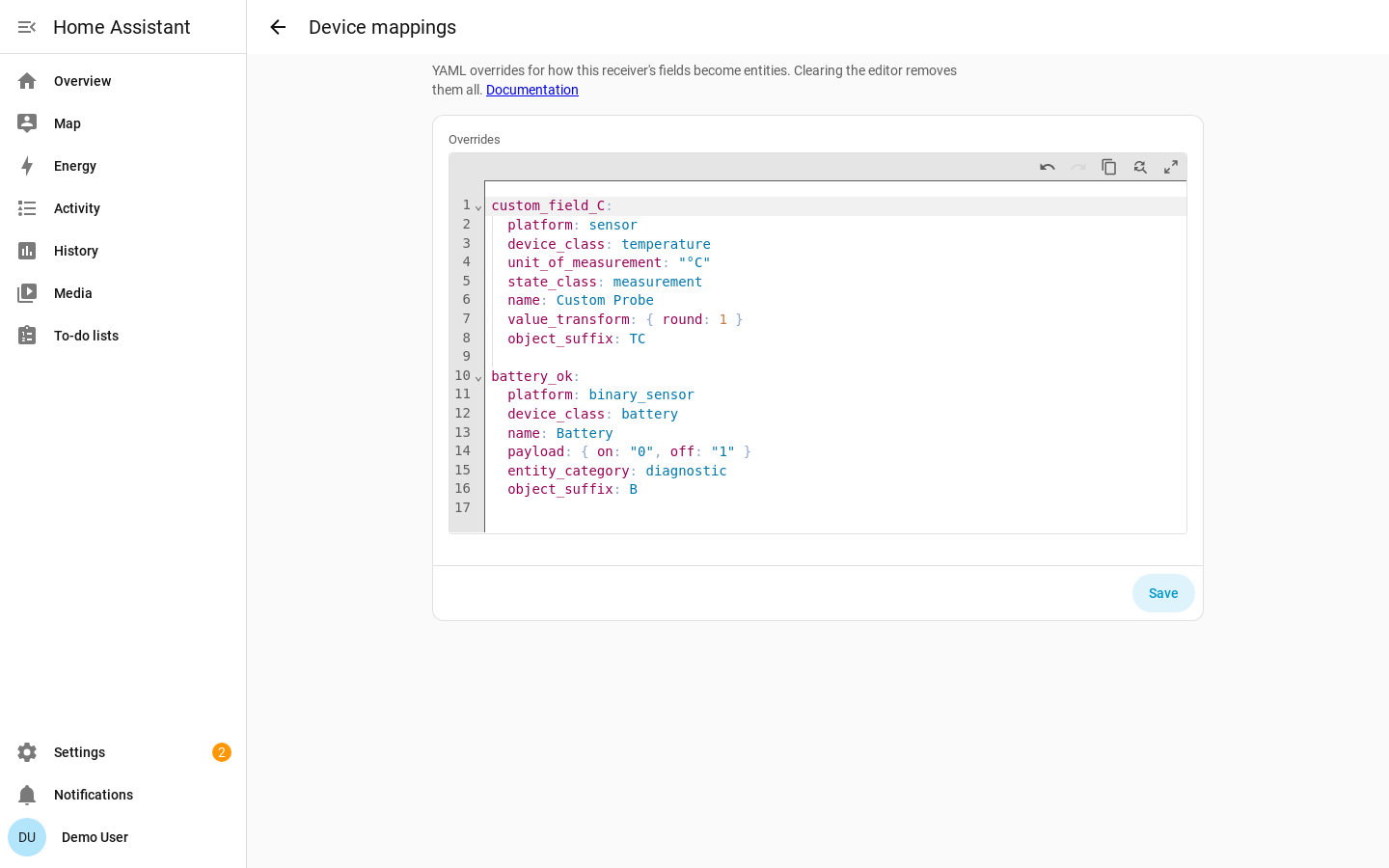
The Device mappings step opens Home Assistant's built-in YAML editor pre-filled
with that receiver's current mappings. You edit mappings as YAML, using the
same schema as pyrtl_433: top-level keys are rtl_433
field names, values are entry mappings. They may optionally include a skip_keys: list to add extra
skip entries, and an optional models: block to
add or override model-scoped descriptors.
Mappings are stored per receiver in that receiver's config entry — each receiver has its own independent set. The editor:
- Blocks invalid YAML syntax before you can submit.
- Validates the mapping schema on save and rejects bad input with a per-field error naming the offending field and the reason.
- Reloads the receiver automatically.
To find fields your device reports that do not yet have entities, download
diagnostics for the receiver from Settings → Devices & Services → the rtl_433
integration → ⋮ → Download diagnostics and inspect unmatched_field_keys. Each
key may need a mapping or, for noise and identity data, an entry in skip_keys:.
Comments and formatting are not preserved. The editor returns parsed YAML, so any comments or hand-formatting in what you paste are dropped once the mappings are stored. The mapping values are preserved.
Mappings you add in the UI override or extend pyrtl_433:
- A field present in both the UI mapping and pyrtl_433: the UI mapping wins (full entry replacement, not a deep merge), so you can correct a unit, device class, or transform.
- A field present only in the UI mapping: it is added as a new mapping.
skip_keysentries in the UI mapping are combined with the upstream skip list.- A
models:block in the UI mapping is merged per(model, field_key): a UI model-scoped entry replaces the upstream one for the same model and field, while other upstream model fields are preserved. Per the precedence rules, a model-scoped entry (from either source) always beats a global one — so an upstreammodels:entry outranks a UI global entry for a matching model.
Paste a mapping like the following into the Device mappings editor. This
example adds an unmapped field and re-classifies battery_ok as a low-battery
binary problem sensor:
custom_field_C:
  platform: sensor
  device_class: temperature
  unit_of_measurement: "°C"
  state_class: measurement
  name: Custom Probe
  value_transform: { round: 1 }
  object_suffix: TC

battery_ok:
  platform: binary_sensor
  device_class: battery     # HA "battery": on == problem (low)
  unit_of_measurement: null
  state_class: null
  name: Battery
  payload: { on: "0", off: "1" }   # battery_ok == 0 means low -> problem
  entity_category: diagnostic
  object_suffix: B
The editor also accepts skip_keys: entries and model-scoped mappings. Use a
model-scoped mapping to change how a field is handled for one device model.
Nest the per-model descriptors under a models: block keyed by the
exact rtl_433 model string; a model-scoped entry beats any global one for that
model (see precedence). For example, to rename
one model's temperature sensor and round it more finely than the global default,
leaving every other model untouched:
models:
  Acurite-Tower: # exact rtl_433 model string
    temperature_C:
      platform: sensor
      device_class: temperature
      unit_of_measurement: "°C"
      state_class: measurement
      name: Outdoor temperature
      value_transform: { round: 2 }
      object_suffix: T
Choosing the right scope
Mapping overrides are global or model-scoped only — they apply to every device
of a model, not a single physical unit. model is the most specific scope the
library has, and for some decoders it is coarser than the hardware it covers:
every Honeywell 5800 door sensor, window sensor, PIR and tilt sensor reports
model: "Honeywell-Security".
| What is wrong | Where to fix it |
|---|---|
| A field is mapped wrongly for every device that emits it | Device mappings, as a top-level entry |
| A field is mapped wrongly for one model | Device mappings, inside a models: block |
| One unit needs a different availability timeout, meter calibration or motion clear delay | Device settings |
| One unit's entity is correct but shown as the wrong kind of thing | Home Assistant's entity settings — see below |
Retyping a single entity
Home Assistant can change a binary sensor's device class per entity, which is finer than any mapping override can be. Open the entity, then its settings (the gear icon) → Shown as, and pick a different class. The choice lives in Home Assistant's entity registry, so it survives restarts and hub reloads, and the value the integration shipped is retained separately as the entity's original class — a later library update will not overwrite your choice.
This is how you tell one Honeywell 5800 sensor from another. They all share a
model string, so a models: entry cannot separate them, and which loop bit a
given sensor reports on is chosen by whoever installed it:
- A door or window sensor reports on
contact_openorreed_open. Both ship as Opening; retype to Door or Window for the matching icon and wording. - A PIR reports on the same fields, so retype it to Motion or Occupancy.
- The loop your sensor does not use still produces an entity, which simply never changes state. Hide it from the same entity settings page.
Entity category is not adjustable from the UI
Home Assistant has no per-entity control for entity category, so a field
the library marks diagnostic cannot be promoted out of a device's
Diagnostic section from Home Assistant. That one has to be right in the
library — if a field is categorized wrongly for your hardware, please
open an issue.
Mapping entry schema (summary)
The full schema is documented in the pyrtl_433 device-library reference.
Top-level keys are rtl_433 field names exactly as they appear in the JSON
event (temperature_C, wind_avg_km_h, battery_ok). Names are matched
case-sensitively, and not every decoder uses snake_case — SCMplus emits
Consumption, ERT-SCM emits consumption_data. A key that differs only in case
will not match, so no entity appears in Home Assistant.
temperature_C:
  platform: sensor            # sensor | binary_sensor | event
  device_class: temperature   # an HA device class, or null
  unit_of_measurement: "°C"   # or null
  state_class: measurement    # measurement | total | total_increasing | null
  name: null                  # null/omitted => HA names it from device_class
  value_transform: { round: 1 }  # numeric transform (sensor only)
  object_suffix: T            # short, STABLE unique-id token
platform and object_suffix require values. device_class,
unit_of_measurement and state_class must be present but may be null.
The rest are optional: value_transform (float / int / scale /
offset / round, applied in that order) for sensors, payload:
{ on: <raw>, off: <raw> } for binary sensors, event_map for event entities,
plus clear_delay, event_driven, force_update, entity_category,
enabled_by_default and icon. A separate _skip_keys.yaml in the library
lists identity and transport fields (model, id, channel, mic, mod,
protocol, …) that must never become entities; a UI mapping can add to that
list with a top-level skip_keys: sequence.
object_suffix is part of every entity's unique ID, so changing it orphans
existing entities.
Two attributes control timing and availability: clear_delay
(Motion / occupancy) and
event_driven (Availability classification).
Motion / occupancy
PIR / occupancy decoders (Interlogix, Risco Agility, Kerui, …) emit motion: 1
on detection and send no off message. Their motion mapping uses a
binary_sensor with device class occupancy and only an on token. A timer
turns the sensor off:
motion:
  platform: binary_sensor
  device_class: occupancy
  name: Motion
  payload: { on: "1" }   # detect-only: no off token
  clear_delay: 90        # synthesize off 90 s after the last detection
  object_suffix: motion
clear_delay sets how many seconds the sensor stays on after a detection. Each
new detection restarts the timer. The default is 90 seconds.
When Home Assistant restarts, a motion sensor comes back off rather than on, since no timer would be left to clear a restored on. A device that has never reported stays unknown until its first detection.
Per-device override. The delay can be tuned per device in Device settings — Settings → Devices & Services → rtl_433 → Configure (the gear icon) → (device step) exposes a Motion clear delay (seconds) field. Leave it blank to use the 90-second default.
Availability classification
A device is marked unavailable when it is not received past its availability timeout. RF devices signal availability only by transmitting, so the timeout is resolved per device, in this order:
- A per-device override.
- An explicit receiver default.
- A device-class default derived from the device's known fields.
The known fields are both its adopted (persisted) fields and its latest payload, so an event-driven device that has been silent since a restart is still classified correctly before it next transmits.
The class default has two outcomes:
- Event-driven → never-expire (the device, and all its entities including
battery, stay available once seen). These devices transmit only on a state
change — a door opening, motion, a button press — so a finite timeout
could mark a healthy device unavailable. A field is
event-driven when it uses
platform: eventor setsevent_driven: true(e.g.motion,contact_open,reed_open,closed,alarm). The set is derived from the active library (upstream descriptors plus user mappings). - Periodic → a finite default (10 min). Everything else — temperature, humidity, power, etc. — which reports at regular intervals.
Diagnostic fields such as battery_ok do not decide the class on their own. If a
device also has an event-driven field, the whole device uses the event-driven
default, so its battery and other entities stay available between events. An
explicit per-device or receiver timeout always overrides the class default.
Because an event-driven device's availability no longer signals freshness, its per-device Last seen timestamp sensor is enabled by default, and is disabled for periodic devices. It stays available once seen, so "no signal for N minutes" automations keep working.
Event entities
platform: event is for momentary actions such as remote buttons and doorbell
presses, which have no lasting on/off state. Each live transmission fires one
Home Assistant event, and the entity
stays available between presses. Event entries live in their
own library file, events.yaml:
button:
  platform: event
  device_class: button     # an EventDeviceClass
  name: Button
  object_suffix: button
How event entries differ from sensor / binary_sensor:
- By default the fired
event_typeis the stringified field value (str(value)). There is nopayloadand novalue_transform— the raw value is stringified directly. - By default
event_typesare auto-populated, not declared. Each newly observed value is recorded as a valid type the first time it is seen and persisted per device, so after a restart the entity rebuilds knowing the types it has seen before. You never list them in the YAML. - A field whose value varies (a remote that reports which button was pressed) auto-populates several types; a field that only ever emits one distinct value fires that one type on every transmission.
- The fired event carries no extra attributes — the type is the only payload.
device_classis anEventDeviceClass(button,doorbell).
event_map: naming raw values
The optional event_map attribute overrides the default stringified behavior:
it maps a stringified raw value → named event_type. When present:
- A transmission whose raw value is in the map fires the mapped type;
values not in the map still pass through as
str(value). - The mapped types are declared up front in
event_types(in map order), rather than only appearing once observed — so adevice_triggerlists them even before the first press.
The doorbell is the upstream example. secret_knock is emitted on every
press: raw 0 is a regular single press and raw 1 is a "secret knock" (the
button pressed three times rapidly). It maps both onto Home Assistant's doorbell
standard:
secret_knock:
  platform: event
  device_class: doorbell
  name: Doorbell
  object_suffix: secret_knock
  event_map:
    "0": ring          # DoorbellEventType.RING — the HA standard type
    "1": secret_knock  # custom type for the 3x-rapid "secret knock"
The upstream events.yaml has two examples:
| Field | device_class |
Notes |
|---|---|---|
button |
button |
Remote / key-fob button code; the value is the pressed code, so distinct presses auto-populate several types. |
secret_knock |
doorbell |
Honeywell ActivLink doorbell press; emitted on every press (0 regular → ring, 1 secret knock → secret_knock) via event_map. |
Model-scoped mappings (models:)
The top-level keys above are the global defaults: a temperature_C entry
applies to every device that emits temperature_C. Some fields, though, need
a different descriptor depending on the device model — most notably the
utility-meter consumption counters (Consumption, consumption_data), whose
unit and scale are not carried in the RF signal and differ between meter
models.
For those, a library file (or a UI mapping) may carry an optional top-level
models: block keyed by the exact rtl_433 model string, each model mapping
to a table of field_key → descriptor using the same per-field attributes as a
global entry:
models:
  Some-Model-Name:            # an exact rtl_433 `model` string
    consumption_data:
      platform: sensor
      device_class: energy
      unit_of_measurement: kWh
      state_class: total_increasing
      name: Consumption
      value_transform: { scale: 1 }
      object_suffix: consumption
models: is additive and optional, and models is a reserved top-level key —
you cannot have a field literally named models. See the
schema reference for the full rules.
Lookup resolution order
When the integration builds an entity for a field on a device, it resolves the descriptor most-specific first:
- The model-scoped entry for
(model, field_key), if the device's model has amodels:block with that field. - Otherwise the global flat entry for
field_key. - Otherwise the field is unmapped → no entity.
So a models: entry only affects the model it names; every other model keeps the
global descriptor for that same field.
Precedence (specificity-first)
Combined with UI mappings and the per-device meter calibration (the Device settings page), the full precedence for a single field on a single device is, highest to lowest:
- Per-device calibration (commodity + base unit + scale, set in the options flow) — applies only to the consumption field(s) of the one calibrated device.
- Model-scoped entry — UI
models:entry, else upstreammodels:entry. - Global flat entry — UI flat key, else upstream flat key.
- Unmapped → no entity.
The rule is specificity-first: a model-scoped entry always beats a global one
regardless of source. In particular an upstream models: entry outranks a
UI global entry for a matching model. Within each tier the UI mapping beats
pyrtl_433.
pyrtl_433 does not include guessed consumption mappings for real meters. A wrong scale would produce incorrect Energy data. For a real meter, use per-device calibration until its model's unit and scale are confirmed. The mapping example above shows the syntax only.
Contributing device mappings
To add support for your own installation, use the mapping editor.
To include a mapping in future releases, contribute it to
pyrtl_433. The YAML library has lived
there since version 0.3.0 and is shared by its consumers. The files live under
pyrtl_433/library/data/, one themed file per domain (temperature.yaml,
humidity_moisture.yaml, power_electrical.yaml, events.yaml, misc.yaml, …,
plus _skip_keys.yaml). A merged mapping reaches Home Assistant users on the
next pyrtl_433 release and the integration's requirement bump.
Add-a-mapping workflow
- Find the field name. Watch your rtl_433 stream, or download diagnostics
for the receiver from Settings → Devices & Services → the rtl_433 integration →
⋮ → Download diagnostics. The export lists unmapped fields your hardware has
sent in
unmatched_field_keys. Each key needs either a mapping or, for noise and identity data, an entry for_skip_keys.yaml. rtl_433 field names are case-sensitive and unit-suffixed (temperature_C, nottemperature). - Add the entry in pyrtl_433. Pick the themed file that matches the field's
domain (or
misc.yaml), key the entry by the exact field name, and fill in the attributes following the schema reference. Copy a similar existing entry as a template. That repository's own contributing guide covers validation and its test suite. - Add a fixture here too. Once the mapping is merged and released, add a
fixture under
tests/fixtures/in this repository with a real event from your device.tests/test_fixture_coverage.pysweeps every fixture against the installed library and fails if any field in it has no descriptor and no skip-key entry. This checks that mappings match the events used by this integration.
Field names are matched exactly, and a mismatch is silent
A key that differs from the decoded field name, even only in case, creates
no entity and produces no warning or error. SCMplus
emits Consumption (CamelCase) while ERT-SCM emits consumption_data
(snake_case); both decoders are in the same protocol family. Copy the name
from the decoder's data_make() call, or better, from a real event.
For the SCM family and Acurite this is checked against rtl_433's actual
output: tests/fixtures/generated/ holds events decoded from real .cu8
captures by scripts/regen_capture_fixtures.py, and CI re-decodes and diffs
them. See tests/fixtures/generated/README.md if you want to extend that
to another protocol.
Notes on fields that cannot be expressed declaratively
The upstream mappings table includes two device_automation entries —
channel and button — that publish MQTT device triggers (e.g.
button_short_release) rather than entities. These have no sensor /
binary_sensor equivalent in this schema:
channelis already a device-identity key and lives in_skip_keys.yaml.buttonis modelled as an event entity instead of an MQTT device trigger — see the library'sevents.yaml.
All other entries from the upstream table are included.